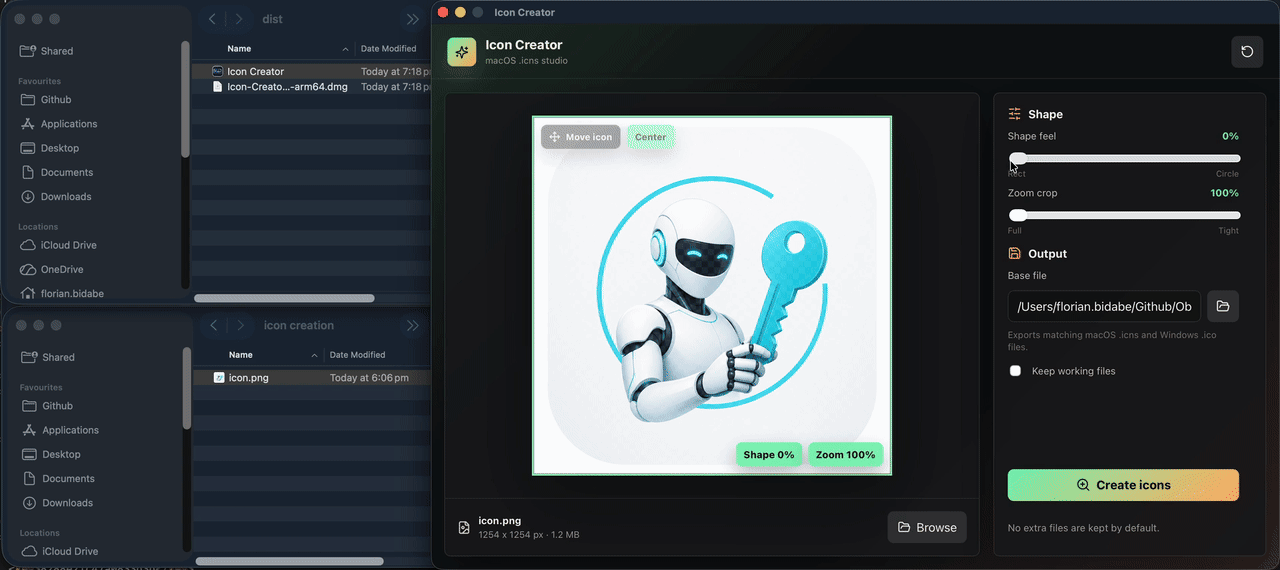
Icon Creator by Florian Bidabe and Photon Security prepares application icons from an image you already have. Load the artwork, decide how it should fill a square, adjust the corners and create the output files. The same operation produces Windows ICO, macOS ICNS and a PNG image. This is useful when one project needs consistent artwork for several platforms and you want to settle the crop before exporting the different formats.
The published Windows release is version 1.3.10, supplied as an executable for x64 computers. Its main task is converting and shaping a source image. If the picture still needs lettering, layered composition or detailed retouching, finish that work in GIMP first. Starting with a finished design makes it easier to judge whether the icon remains recognizable at small sizes.
Choose the source and frame the image
Use Browse or drag a file into the preview. Supported source formats include PNG, JPG, JPEG, GIF, WebP, SVG, ICO and ICNS. A wide or tall picture does not have to lose its edges: the zoom control can reduce it to an exact fit, leaving transparent space where the square is uncovered. Increasing zoom creates a tighter crop, while dragging the preview lets you reposition the subject within the available overflow.
Treat framing as a readability decision. A detailed landscape may look attractive in the large preview but become indistinct on a small toolbar. Keep the important shape prominent and leave enough room around it for the chosen corner radius. The Shape feel control changes the rounded outline; it does not redraw details inside the source image or invent missing edges.
Transparency and the three export files
Transparent outer color targets a flat background connected to the outside edge, such as white or an even off-white surround. It converts that connected color to alpha before applying the corner mask. It is not a general subject-selection tool for complicated photographs. For difficult boundaries, Paint.NET can be part of the preparation workflow before the resulting PNG is opened in Icon Creator.
Choose a base output name and create the icons. The program writes matching ICNS, ICO and PNG siblings rather than treating the selected filename extension as a request for only one format. The PNG is 1024 by 1024 pixels. The ICO contains images at 16, 24, 32, 48, 64, 128 and 256 pixels, allowing Windows applications to use a suitable embedded size.
Check more than the largest result before adopting the icon. A small embedded frame has fewer pixels in which to represent thin lines, text and spacing. The temporary working image and iconset directory are normally cleaned up after export; Keep working files retains them when you want to inspect the generated materials.
Existing icons and local-file limits
When opening an ICO or ICNS file, the application selects its largest supported frame and proposes an output name ending in -edited. This is a starting name, not an unconditional safeguard: existing files with the chosen output names can be replaced. Use a separate destination or a fresh basename when keeping earlier results matters.
SVG input is rasterized, and GIF support should not be confused with an animation-editing workflow. Older ICNS files containing only JPEG2000 images are unsupported. There is no verified layered drawing interface, cursor editor or independent editing of every embedded ICO frame. Image conversion reads and writes local files; it does not require uploading the source to a conversion website.
Running on Windows and licence information
The desktop interface uses Microsoft Edge WebView2 Runtime. The released package is AMD64, with no separate x86 or native Windows ARM64 asset confirmed. Go, Node.js and the Wails build tools listed in the repository concern compiling the source; they are not instructions to install a development environment before running the published GUI.
The repository offers the executable without a payment step and accepts optional donations. However, no project licence file or explicit redistribution terms were found. Publicly visible source code alone does not establish an open-source licence or unrestricted commercial redistribution. The catalogue therefore leaves the licence classification unverified rather than assigning permissions the publisher has not stated.